Visual Studio Code Widget#
Shows a list of your recently opened projects in Visual Studio Code. It opens a clean popup list where you can quickly launch any of your recent folders or files in VS Code with a single click.
| Option | Type | Default | Description |
|---|---|---|---|
label |
string | '<span>\ue943</span>' |
The format string for the widget. |
label_alt |
string | '<span>\ue943</span> recents' |
The alternative format string for the widget. |
menu_title |
string | <span style='font-weight:bold'>VS</span>Code recents |
The title of the menu. |
icons |
dict | {'folder': '\ue8b7', 'file': '\ue8e5', 'remote': '\ue8af'} |
The icons for folders, files, and remote sessions. Setting any icon to "" will hide it. |
truncate_to_root_dir |
bool | false |
Whether to truncate the path to the projects root directory. |
max_number_of_folders |
int | 30 |
The maximum number of folders to display in the menu. |
max_number_of_files |
int | 30 |
The maximum number of files to display in the menu. |
state_storage_path |
string | '' |
Absolute path to the folder containing editor data, examples are shown below. |
modified_date_format |
string | 'Date modified: %Y-%m-%d %H:%M' |
The format for the modified date of the files and folders. |
cli_command |
string | 'code' |
The CLI command to execute when a workspace is clicked, doesn't need to contain folder name. For example, code, windsurf. |
menu |
dict | {'blur': True, 'round_corners': True, 'round_corners_type': 'normal', 'border_color': 'System', 'alignment': 'right', 'direction': 'down', 'offset_top': 6, 'offset_left': 0} |
Menu settings for the widget. |
callbacks |
dict | {'on_left': 'toggle_menu', 'on_middle': 'do_nothing', 'on_right': 'toggle_label'} |
Callbacks for mouse events on the widget. |
Example Configuration#
vscode:
    type: "yasb.vscode.VSCodeWidget"
    options:
      label: "<span>\ue943</span>"
      label_alt: "<span>\ue943</span> recents"
      menu_title: "<span style='font-weight:bold'>VS</span>Code recents"
      icons:
        folder: "\ue8b7"
        file: "\ue8e5"
        remote: "\ue8af"
      truncate_to_root_dir: false
      max_number_of_folders: 50
      max_number_of_files: 50 # set to 0 if you only want folders
      modified_date_format: "Date modified: %Y-%m-%d %H:%M"
      cli_command: "code" # or "codium" or "windsurf" or any other CLI command to open the workspace
      menu:
        blur: true
        round_corners: true
        round_corners_type: "normal"
        alignment: "center"
        offset_top: 6
        offset_left: 0
Description of Options#
- label: The format string for the widget.
- label_alt: The alternative format string for the widget.
- menu_title: The title of the menu.
- icons: The icons for the folders, files, and remote sessions (WSL/SSH). Setting any icon string to
""(empty) acts as a hide option. - truncate_to_root_dir: Whether to truncate the path to the projects root directory. Example
C:\Users\user\Documents\Projects\ProjectNamewill be truncated toProjectName. - max_number_of_folders: The maximum number of folders to display in the menu.
- max_number_of_files: The maximum number of files to display in the menu (set to 0 if you only want folders).
- max_field_size: Deprecated (ignored). Previously used to limit path string length before truncation. It is now handled dynamically and natively using font-aware elision (
...suffix). - state_storage_path: Absolute path to the folder containing editor data. For example,
C:\Users\user\.vscode-shared\sharedStorage\state.vscdbfor Visual Studio Code,C:\Users\user\AppData\Roaming\Windsurf\User\globalStorage\state.vscdbfor Windsurf, etc. If left empty, it will use the default VSCode path. - modified_date_format: The date format for the modified date of the files and folders. It uses Python's
strftimeformat. For example, '%Y-%m-%d %H:%M' for2025-06-01 12:00. - cli_command: The cli command to execute when a workspace is clicked, doesn't need to contain folder name. For example,
code,windsurf. - callbacks: A dictionary specifying the callbacks for mouse events. The keys are
on_left,on_middle, andon_right, and the values are the names of the callback functions. - callback functions:
toggle_menu: Toggles the menu of the widget.toggle_label: Toggles the label of the widget.
Widget Style#
.vscode-widget {}
.vscode-widget .widget-container {}
.vscode-widget .widget-container .label {}
.vscode-widget .widget-container .icon {}
 /* Popup menu*/
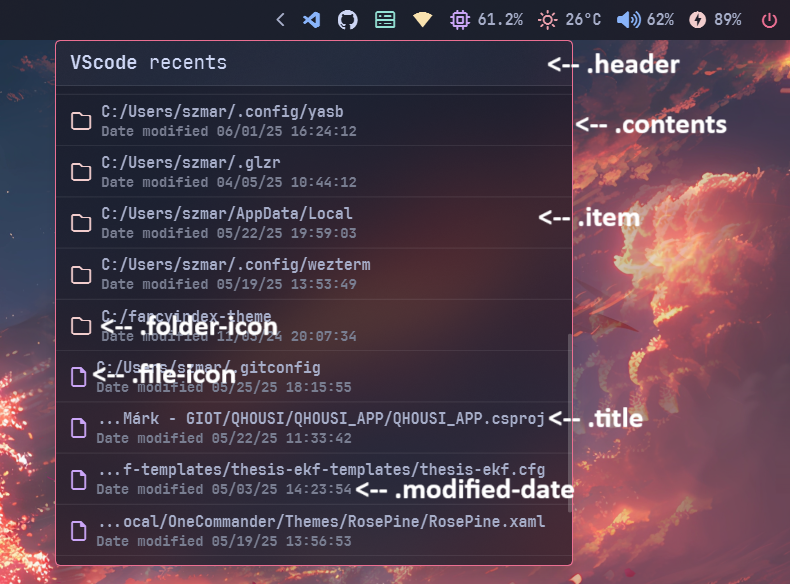
.vscode-menu {}
.vscode-menu .header {}
.vscode-menu .header .title {}
.vscode-menu .header .filter-button {}
.vscode-menu .header .filter-button.active {}
.vscode-menu .search-bar {}
.vscode-menu .search-bar .input {}
.vscode-menu .contents {}
.vscode-menu .contents .item {}
.vscode-menu .contents .item .title {}
.vscode-menu .contents .item .modified-date {}
.vscode-menu .contents .item .folder-icon {}
.vscode-menu .contents .item .file-icon {}
.vscode-menu .contents .item .remote-icon {}
.vscode-menu .no-recent {}
Example Style for the Visual Studio Code Widget#
.vscode-widget .icon {
    color: #89b4fa;
    font-family: "Segoe Fluent Icons";
}
.vscode-menu {
    max-height: 500px;
    background: rgba(32, 32, 32, 0.6);
    min-width: 360px;
}
.vscode-menu .header {
    padding: 12px 16px;
    border-bottom: 1px solid rgba(255, 255, 255, 0.1);
    background-color: transparent
}
.vscode-menu .header .title {
    font-size: 16px;
    font-weight: 400;
}
.vscode-menu .header .filter-button {
    font-size: 12px;
    font-weight: 600;
    padding: 2px 6px;
    border-radius: 4px;
    color: #acacac;
}
.vscode-menu .header .filter-button:hover {
    color: #ffffff;
}
.vscode-menu .header .filter-button.active {
    background-color: rgba(255, 255, 255, 0.15);
    color: #ffffff;
}
.vscode-menu .search-bar {
    padding: 6px 12px;
    border-bottom: 1px solid rgba(255, 255, 255, 0.1);
    background-color: transparent;
}
.vscode-menu .search-bar .input {
    background-color: transparent;
    border: 1px solid rgba(255, 255, 255, 0.12);
    border-radius: 4px;
    color: #ffffff;
    padding: 4px 8px;
    font-size: 12px;
}
.vscode-menu .search-bar .input:focus {
    border-color: rgba(255, 255, 255, 0.3);
}
.vscode-menu .contents {
    background-color: transparent;
}
.vscode-menu .contents .item {
    min-height: 40px;
    margin:0px 8px;
    border-radius: 8px;
    padding:4px 8px;
}
.vscode-menu .contents .item .title {
    font-size: 13px;
     font-weight: 600;
}
.vscode-menu .contents .item .modified-date {
    font-size: 12px;
    font-weight: 600;
     color: #8f8f8f;
}
.vscode-menu .contents .item .folder-icon,
.vscode-menu .contents .item .file-icon,
.vscode-menu .contents .item .remote-icon {
    font-size: 16px;
    color: #ffffff;
    font-family: "Segoe Fluent Icons";
    margin-right: 8px;
}
.vscode-menu .contents .item .file-icon {
    color: #c7c7c7;
}
.vscode-menu .contents .item .remote-icon {
    color: #00f549;
}
.vscode-menu .contents .item:hover {
    background-color: rgba(255, 255, 255, 0.1);
    cursor: pointer;
}
Preview of the Widget#