Weather Widget Options#
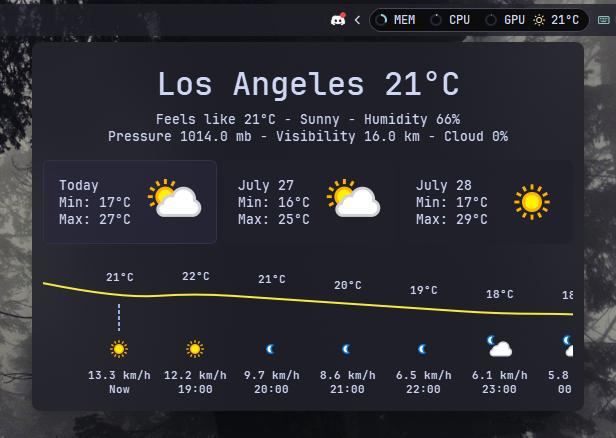
Shows the current weather conditions and temperature outside. You can customize the temperature units (Celsius or Fahrenheit), update intervals, and click to view detailed weather reports in your browser.
| Option | Type | Default | Description |
|---|---|---|---|
label |
string | '<span>{icon}</span> {temp}' |
The format string for the weather label. You can use placeholders like {temp}, {icon}, etc. |
label_alt |
string | '{location}: Min {min_temp}, Max {max_temp}, Humidity {humidity}' |
The alternative format string for the weather label. Useful for displaying additional weather details. |
class_name |
string | "" |
Additional CSS class name for the widget. |
tooltip |
boolean | true |
Whether to show a tooltip with the min and max temperatures. |
update_interval |
integer | 3600 |
The interval in seconds to update the weather data. Must be between 60 and 36000000. |
hide_decimal |
boolean | false |
Whether to hide the decimal part of the temperature. |
location |
string | 'London' |
The location for which to fetch the weather data. |
show_alerts |
boolean | false |
Whether to show weather alerts. |
units |
string | 'metric' |
The units for the weather data. Can be 'metric' or 'imperial'. |
api_key |
string | '0' |
The API key for accessing the weather service. |
icons |
dict | { 'sunnyDay': '\ue30d', 'clearNight': '\ue32b', 'cloudyDay': '\ue312', 'cloudyNight': '\ue311', 'rainyDay': '\udb81\ude7e', 'rainyNight': '\udb81\ude7e', 'snowyDay': '\udb81\udd98', 'snowyNight': '\udb81\udd98', 'blizzardDay': '\uebaa', 'default': '\uebaa' } |
A dictionary of icons for different weather conditions. |
callbacks |
dict | { 'on_left': 'do_nothing', 'on_middle': 'do_nothing', 'on_right': 'do_nothing' } |
Callbacks for mouse events on the weather widget. |
weather_card |
dict | See below | Configuration for the weather card popup display. |
Note
: To use the weather widget, you need to obtain a free API key from weatherapi.com and set it in the api_key option.
Minimal Configuration#
weather:
  type: "yasb.weather.WeatherWidget"
  options:
    label: "<span>{icon}</span> {temp}"
    label_alt: "{location}: Min {min_temp}, Max {max_temp}, Humidity {humidity}"
    api_key: "3bf4cf9a7c3f40d6b31174128242807" # Get your free API key from https://www.weatherapi.com/
    show_alerts: true
    tooltip: true
    update_interval: 600 # Update interval in seconds, Min 600 seconds
    hide_decimal: true
    units: "metric" # Can be 'metric' or 'imperial'
    location: "Los Angeles, CA, USA" # You can use "USA Los Angeles 90006" {COUNTRY CITY ZIP_CODE}, or just city.
    callbacks:
      on_left: "toggle_card"
      on_middle: "do_nothing"
      on_right: "toggle_label"
Advanced Configuration#
weather:
  type: "yasb.weather.WeatherWidget"
  options:
    label: "<span>{icon}</span> {temp}"
    label_alt: "{location}: Min {min_temp}, Max {max_temp}, Humidity {humidity}"
    api_key: "3bf4cf9a7c3f40d6b31174128242807" # Get your free API key from https://www.weatherapi.com/
    show_alerts: true
    tooltip: true
    update_interval: 600 # Update interval in seconds, Min 600 seconds
    hide_decimal: true
    units: "metric" # Can be 'metric' or 'imperial'
    location: "Los Angeles, CA, USA" # You can use "USA Los Angeles 90006" {COUNTRY CITY ZIP_CODE}, or just city.
    callbacks:
      on_left: "toggle_card"
      on_middle: "do_nothing"
      on_right: "toggle_label"
    icons:
      sunnyDay: "\ue30d"
      clearNight: "\ue32b"
      cloudyDay: "\ue312"
      cloudyNight: "\ue311"
      rainyDay: "\ue308"
      rainyNight: "\ue333"
      snowyDay: "\ue30a"
      snowyNight: "\ue335"
      blizzardDay: "\udb83\udf36"
      blizzardNight: "\udb83\udf36"
      foggyDay: "\ue303"
      foggyNight: "\ue346"
      thunderstormDay: "\ue30f"
      thunderstormNight: "\ue338"
      default: "\uebaa"
    weather_card:
      blur: true
      round_corners: true
      round_corners_type: "normal"
      border_color: "system"
      alignment: "right"
      direction: "down"
      icon_size: 64
      show_hourly_forecast: true # Set to False to disable hourly forecast
      time_format: "24h" # can be 12h or 24h
      hourly_point_spacing: 76
      hourly_icon_size: 32 # better to set 16, 32 or 64 for better quality
      icon_smoothing: true # should be true for smoother icon or false for sharper icon if using 16, 32 or 64 for hourly_icon_size
      temp_line_width: 2 # can be 0 to hide the temperature line
      current_line_color: "#8EAEE8"
      current_line_width: 1 # can be 0 to hide the current hour line
      current_line_style: "dot"
      hourly_gradient:
        enabled: false
        top_color: "#8EAEE8"
        bottom_color: "#2A3E68"
      hourly_forecast_buttons: # Optional hourly forecast data type toggle buttons, default disabled
        enabled: true # Set to false to hide the buttons
        default_view: "temperature" # Default view when opening the weather card. Options: "temperature", "rain", "snow"
        temperature_icon: "\udb81\udd99"
        rain_icon: "\udb81\udd96"
        snow_icon: "\udb81\udd98"
      weather_animation:
        enabled: false
        snow_overrides_rain: true
        temp_line_animation_style: both # can be "rain", "snow", "both", or "none"
        rain_effect_intensity: 1.0 # 0.01 - 10.0
        snow_effect_intensity: 1.0 # 0.01 - 10.0
        scale_with_chance: true
        enable_debug: false
Description of Options#
- label: The format string for the weather label. You can use placeholders like
{temp},{min_temp},{max_temp},{feelslike},{location},{humidity},{icon},{conditions},{wind},{wind_dir},{wind_degree},{pressure},{precip},{uv},{vis},{cloud},{hourly_chance_of_rain},{hourly_chance_of_snow},{daily_chance_of_rain},{daily_chance_of_snow}. - label_alt: The alternative format string for the weather label. Useful for displaying additional weather details.
- class_name: Additional CSS class name for the widget. This allows for custom styling.
- update_interval: The interval in seconds to update the weather data. Must be between 60 and 36000000.
- hide_decimal: Whether to hide the decimal part of the temperature.
- location: The location for which to fetch the weather data. You can use example "USA Los Angeles 90006" {COUNTRY CITY ZIP_CODE}, or just city. Location can be set to
env, this means you have to setYASB_WEATHER_LOCATIONin environment variable or you can set it directly in the configuration file. - api_key: The API key for accessing the weather service. You can get free API key
weatherapi.com. API key can be set toenv, this means you have to setYASB_WEATHER_API_KEYin environment variable or you can set it directly in the configuration file. - show_alerts: Whether to show weather alerts.
- tooltip: Whether to show a tooltip with the min and max temperatures, and precipitation chances (rain/snow are only shown when above 0%).
- units: The units for the weather data. Can be
'metric'or'imperial'. - icons: A dictionary of icons for different weather conditions
sunnyDay,sunnyNight,clearDay,clearNight,cloudyDay,cloudyNight,rainyDay,rainyNight,snowyDay,snowyNight,blizzard,default. - weather_card: Configuration for the weather card popup display. Controls visibility, appearance, and positioning.
- blur: Enable blur effect for the weather card.
- round_corners: Enable round corners for weather card.
- round_corners_type: Border type for weather card can be
normalandsmall. Default isnormal. - border_color: Border color for weather card can be
None,SystemorHex Color"#ff0000". - alignment: Alignment of the weather card. Possible values are
left,center, andright. - direction: Direction of the weather card. Possible values are
upanddown. - offset_top: Offset from the top of the widget in pixels.
- offset_left: Offset from the left of the widget in pixels.
- icon_size: Size of the weather icon in pixels.
- show_hourly_forecast: Whether to show the hourly forecast in the weather card. Set to
Falseto disable hourly forecast. - time_format: Time format for the weather card. Possible values are
12hand24h. - hourly_point_spacing: Spacing between hourly points on a curve.
- hourly_icon_size: Size of the hourly icon. Better to set 16, 32 or 64 for better quality. Icon smoothing should be enabled if using different scaling.
- icon_smoothing: Whether to smooth the icon on hourly view. Can be set to
falsefor better sharpness. - temp_line_width: Width of the temperature line. Setting this to
0will hide the temperature line. - current_line_color: Color of the current hour line.
- current_line_width: Width of the current hour line. Setting this to
0will hide the current hour line. - current_line_style: Style of the current hour line. Possible values are
solid,dash,dot,dashDot,dashDotDot. - hourly_gradient: Configuration for the gradient effect under the hourly line.
- enabled: Whether to enable the gradient effect under the hourly line.
- top_color: Top color of the gradient.
- bottom_color: Bottom color of the gradient.
- hourly_forecast_buttons: Configuration for the data type toggle buttons in the hourly forecast view.
- enabled: Whether to show the toggle buttons. Set to
falseto hide them. - default_view: Which data type to show by default when opening the weather card. Options:
"temperature"(default),"rain", or"snow". - temperature_icon: Icon for the temperature button (default:
"\udb81\udd99"). - rain_icon: Icon for the rain chance button (default:
"\udb81\udd96"). - snow_icon: Icon for the snow chance button (default:
"\udb81\udd98").
- enabled: Whether to show the toggle buttons. Set to
- weather_animation: Configuration for the weather animation effects.
- enabled: Whether to enable the weather animation effects. Make sure to add css styles for the animations.
- snow_overrides_rain: Whether to override the rain animation with the snow animation (if overlapping).
- temp_line_animation_style: Which animation style to use for the temperature line. Options:
rain,snow,both, ornone. - rain_effect_intensity: Intensity of the rain animation. (0.01 - 10.0, Default: 1.0)
- snow_effect_intensity: Intensity of the snow animation. (0.01 - 10.0, Default: 1.0)
- scale_with_chance: Whether to scale the animation intensity with the chance of rain/snow.
- enable_debug: Generate dummy hourly weather data for testing and styling.
- callbacks: A dictionary specifying the callbacks for mouse events. The keys are
on_left,on_middle, andon_right, and the values are the names of the callback functions. Available callback functions aretoggle_card,toggle_label,do_nothing.
Example Style#
.weather-widget {}
.weather-widget.your_class {} /* If you are using class_name option */
.weather-widget .widget-container {}
.weather-widget .label {}
.weather-widget .label.alt {}
.weather-widget .icon {}

/* Individual weather icons */
.weather-widget .icon.sunnyDay {}
.weather-widget .icon.clearNight {}
.weather-widget .icon.cloudyDay {}
.weather-widget .icon.cloudyNight {}
.weather-widget .icon.rainyDay {}
.weather-widget .icon.rainyNight {}
.weather-widget .icon.snowyDay {}
.weather-widget .icon.snowyNight {}
.weather-widget .icon.blizzardDay {}
.weather-widget .icon.blizzardNight {}
.weather-widget .icon.foggyDay {}
.weather-widget .icon.foggyNight {}
.weather-widget .icon.thunderstormDay {}
.weather-widget .icon.thunderstormNight {}
.weather-widget .icon.default {}

/* Weather card style */
.weather-card {
    background-color: rgba(17, 17, 27, 0.5);
}
.weather-card-today {
    border: 1px solid #282936;
    border-radius: 8px;
    background-color:  rgba(17, 17, 27, 0.2);
}
.weather-card-today .label {
    font-size: 12px;
}
.weather-card-today .label.location {
    font-size: 24px;
    font-weight: 700;
}
.weather-card-today .label.alert {
    font-size: 12px;
    font-weight: 700;
    background-color: rgba(247, 199, 42, 0.05);
    border: 1px solid rgba(247, 209, 42, 0.1);
    color: rgba(196, 181, 162, 0.85);
    border-radius: 6px;
    padding: 5px 0;
}
.weather-card-day {
    border: 1px solid #45475a;
    border-radius: 8px;
    background-color:  rgba(17, 17, 27, 0.2);
}

.weather-card-day.active {
    background-color: rgba(40, 40, 60, 0.6);
    border: 1px solid rgba(50, 50, 75, 1);
}

.weather-card-day:hover {
    background-color: rgba(40, 40, 60, 0.6);
}

.weather-card-day .label {
    font-size: 12px;
}

.weather-card .hourly-container {
    border: 1px solid #282936;
    background-color: #3c5fa0;
    border-radius: 8px;
    min-height: 150px;
}

.weather-card .hourly-data {
    /* font-family: 'Segoe UI';*/
    /* color: cyan;*/ /* <- Font color */
    font-size: 12px;
    font-weight: bold;
}

.weather-card .hourly-data.temperature {
    background-color: #FAE93F; /* Temperature curve & line color */
}

.weather-card .hourly-data.rain {
    background-color: #4A90E2; /* Rain curve & line color */
}

.weather-card .hourly-data.snow {
    background-color: #A0C4FF; /* Snow curve & line color */
}

.weather-card .hourly-data .hourly-rain-animation {
    color: rgba(150, 200, 255, 40); /* Rain color */
    background-color: rgba(0, 0, 0, 0.1); /* Rain background color */
}

.weather-card .hourly-data .hourly-snow-animation {
    color: rgba(255, 255, 255, 150); /* Snow color */
    background-color: rgba(0, 0, 0, 0.1); /* Snow background color */
}

/* Hourly forecast toggle buttons */
.weather-card .hourly-data-buttons {
    margin: 0px;
}
.weather-card .hourly-data-button {
    border-radius: 4px;
    min-height: 24px;
    min-width: 24px;
    max-width: 24px;
    max-height: 24px;
    font-size: 14px;
    color: rgba(255, 255, 255, 0.3);
    border: 1px solid transparent;
}
.weather-card .hourly-data-button.active {
    color: #fff;
    background-color: rgba(255, 255, 255, 0.1);
    border: 1px solid rgba(255, 255, 255, 0.1);
}
Preview of the weather card#