Glucose Monitor Widget#
Nightscout (also known as CGM in the Cloud) is an open-source cloud application used by people with diabetes and parents of kids with diabetes to visualize, store and share the data from their Continuous Glucose Monitoring sensors in real-time. Once setup, Nightscout acts as a central repository of blood glucose and insulin dosing/treatment data for a single person, allowing you to view the CGM graph and treatment data anywhere using just a web browser connected to the internet.
There are several parts to this system. You need somewhere online to store, process and visualize this data (a Nightscout Site), something to upload CGM data to your Nightscout (an Uploader), and then optionally you can use other devices to access or view this data (one - or more - Follower).
Go to Nightscout documentation for the details.
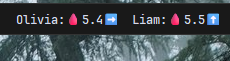
This widget allows you to monitor someone's blood sugar level through Nightscout CGM remote monitor API.
| Option | Type | Default | Description |
|---|---|---|---|
label |
string | <span>\ud83e\ude78</span><span class='sgv'>{sgv}</span><span>{direction}</span> |
The format string for the widget. |
error_label |
string | <span>\ud83e\ude78</span>{error_message} |
The format string for the error widget. |
tooltip |
string | ({sgv_delta}) {delta_time_in_minutes} min |
The format string for the tooltip. |
host |
string | "" |
The URL for your Nightscout CGM remote monitor. |
secret |
string | "" |
The secret key for the CGM API. |
secret_env_name |
string | "" |
If the secret variable is equals to env then widget will try to get secret from the environment variable with a name of the secret_env_name value. |
direction_icons |
dict | See below | Direction icon settings. |
sgv_measurement_units |
string | mmol/l |
SGV measurement units can be mg/dl or mmol/l. |
callbacks |
dict | See below | Callbacks for mouse events on the glucose monitor widget. |
notify_on_error |
boolean | True |
Send a notification on error. |
sgv_range |
dict | {"min": 4, "max": 9} |
Normal SGV range to append in-range or out-range CSS class for span with .sgv CSS class. |
keybindings |
list | [] |
Optional hotkeys. See Keybindings. |
Callbacks#
The callbacks option maps mouse buttons (on_left, on_middle, on_right) to actions. All keys are optional, the values shown are the defaults.
callbacks:
  on_left: "open_cgm"
  on_middle: "do_nothing"
  on_right: "do_nothing"
Available actions:
open_cgm- Open the Nightscout site (host) in your browser.do_nothing- Do nothing.exec <command>- Run a command, for exampleexec cmd.exe /c start ms-settings:network.
Direction Icons Options#
The direction_icons option accepts the following keys. All keys are optional, the values shown are the defaults.
direction_icons:
  double_up: "\u2b06\ufe0f\u2b06\ufe0f"
  single_up: "\u2b06\ufe0f"
  forty_five_up: "\u2197\ufe0f"
  flat: "\u27a1\ufe0f"
  forty_five_down: "\u2198\ufe0f"
  single_down: "\u2b07\ufe0f"
  double_down: "\u2b07\ufe0f\u2b07\ufe0f"
Example Configuration#
  glucose_monitor:
    type: "yasb.glucose_monitor.GlucoseMonitor"
    options:
      label: "<span>\ud83e\ude78</span><span class='sgv'>{sgv}</span><span>{direction}</span>"
      error_label: "<span>\ud83e\ude78</span>{error_message}"
      tooltip: "({sgv_delta}) {delta_time_in_minutes} min"
      host: "https://your-domain.com"
      secret: "env"
      secret_env_name: "YASB_CGM_YOUR_SECRET_ENV_NAME"
      sgv_measurement_units: "mmol/l"
      sgv_range:
        min: 4
        max: 9
Description of Options#
- label: The format string for the widget.
- error_label: The format string for the error widget.
- tooltip: The format string for the tooltip.
- host: The URL for your Nightscout CGM remote monitor.
- secret: The secret key for the CGM API.
- secret_env_name: If the secret variable is equals to
envthen widget will try to get secret from the environment variable with a name of thesecret_env_namevalue. - direction_icons: Direction icon settings.
- sgv_measurement_units: SGV measurement units can be
mg/dlormmol/l. - callbacks: Mouse event callbacks. See Callbacks.
- keybindings: A list of global hotkeys for this widget. See Keybindings.
- notify_on_error: Send a notification on error.
- sgv_range: Normal SGV range to append
in-rangeorout-rangeCSS class for span with.sgvCSS class.
Example Style#
.cgm-widget {
    padding: 0 4px 0 4px;
}

.cgm-widget .widget-container {
}
.cgm-widget .label {
}

.cgm-widget .sgv.in-range {
    color: green;
}

.cgm-widget .sgv.out-range {
    color: red;
}

.cgm-widget .icon {
}
Preview of the Widget#