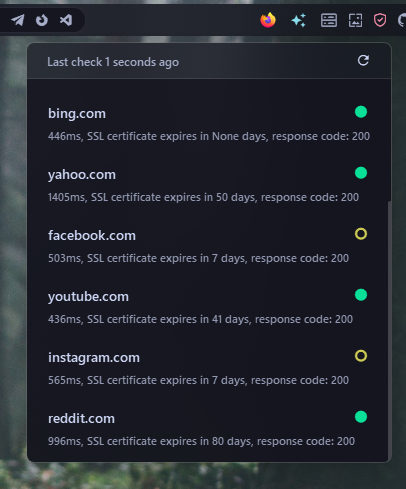
Server Monitor Widget#
Monitors a list of remote servers to make sure they are online and their SSL certificates are valid. It alerts you about certificate expirations, sends desktop notifications when a server goes offline, and shows detailed server statuses in a popup menu.
| Option | Type | Default | Description |
|---|---|---|---|
label |
string | '{icon}' |
The format string for the widget. |
label_alt |
string | '{online}/{offline} of {total} servers' |
The alternative format string for the widget. |
update_interval |
integer | 300 |
The interval in seconds to update the widget. Must be between 10 and 36000. |
tooltip |
boolean | true |
Whether to show the tooltip. |
ssl_check |
boolean | true |
Whether to check SSL certificates. |
ssl_warning |
integer | 30 |
The number of days before expiration to show SSL warnings (1-365). |
ssl_verify |
boolean | true |
Whether to verify SSL certificates. |
desktop_notifications |
dict | {'ssl': false, 'offline': false} |
Desktop notification settings. Show desktop notifications for SSL warnings and offline servers. |
timeout |
integer | 5 |
The timeout in seconds for server checks. Must be between 1 and 30. |
servers |
list | [] |
A list of server entries, each with name and url. |
menu |
dict | See below | Menu settings for the widget. |
icons |
dict | See below | Icons for different server states and actions. |
keybindings |
list | [] |
Optional hotkeys. See Keybindings. |
callbacks |
dict | See below | Callbacks for mouse events on the server monitor widget. |
Callbacks#
The callbacks option maps mouse buttons (on_left, on_middle, on_right) to actions. All keys are optional, the values shown are the defaults.
callbacks:
  on_left: "toggle_label"
  on_middle: "do_nothing"
  on_right: "do_nothing"
Available actions:
toggle_label- Switch betweenlabelandlabel_alt.toggle_menu- Open or close the popup menu.do_nothing- Do nothing.exec <command>- Run a command, for exampleexec cmd.exe /c start ms-settings:network.
Menu Options#
The menu option accepts the following keys. All keys are optional, the values shown are the defaults.
menu:
  blur: true
  round_corners: true
  round_corners_type: "normal"
  border_color: "System"
  alignment: "right"
  direction: "down"
  offset_top: 6
  offset_left: 0
Icons Options#
The icons option accepts the following keys. All keys are optional, the values shown are the defaults.
icons:
  online: "\uf444"
  offline: "\uf4c3"
  warning: "\uf4c3"
  reload: "\udb81\udc50"
Example Configuration#
  server_monitor:
    type: "yasb.server_monitor.ServerMonitor"
    options:
        label: "<span>\uf510</span>"
        label_alt: "{online}/{offline} of {total}"
        ssl_check: true
        ssl_verify: true
        ssl_warning: 10
        timeout: 2
        update_interval: 300
        desktop_notifications:
          ssl: true
          offline: true
        servers:
          - name: Netflix
            url: netflix.com
          - name: Google
            url: google.com
          - name: Yahoo
            url: subdomain.yahoo.com
        menu:
          blur: True
          round_corners: True
          round_corners_type: "normal"
          border_color: "System"
          alignment: "right"
          direction: "down"
        callbacks:
          on_left: "toggle_menu"
          on_right: "toggle_label"
Description of Options#
- label: The format string for the widget.
- label_alt: The alternative format string for the widget.
- update_interval: The interval in seconds to update the widget. Must be between 10 and 36000.
- tooltip: Whether to show the tooltip.
- ssl_check: Whether to check SSL certificates.
- ssl_warning: The number of days before expiration to show SSL warnings (1-365).
- ssl_verify: Whether to verify SSL certificates. If you have self-signed certificates, you may need to set this to
false. - desktop_notifications: Desktop notification settings. Show desktop notifications for SSL warnings and offline servers.
- ssl: Show a notification for SSL certificate warnings.
- offline: Show a notification when a server goes offline.
- timeout: The timeout in seconds for server checks. Must be between 1 and 30.
- servers: A list of server entries. Each entry has:
- name: The display name shown in the menu.
- url: The server hostname to check.
- menu: A dictionary specifying the menu settings for the widget. It contains the following keys:
- blur: Enable blur effect for the menu.
- round_corners: Enable round corners for the menu (this option is not supported on Windows 10).
- round_corners_type: Set the type of round corners for the menu (normal, small) (this option is not supported on Windows 10).
- border_color: Set the border color for the menu (this option is not supported on Windows 10).
- alignment: Set the alignment of the menu (left, right).
- direction: Set the direction of the menu (up, down).
- offset_top: Set the offset from the top of the widget.
- offset_left: Set the offset from the left of the widget.
- icons: Icons for different server states and actions.
- keybindings: A list of global hotkeys for this widget. See Keybindings.
- callbacks: Mouse event callbacks. See Callbacks.
Example Style#
.server-widget {
    padding: 0 6px 0 6px
}
.server-widget .widget-container {}
.server-widget .label {}
.server-widget .icon {
    font-size: 14px
}
.server-widget .warning .icon {
    color: #f9e2af
}
.server-widget .error .icon {
    color: #f38ba8
}
.server-menu {
    background-color:rgba(17, 17, 27, 0.4);
}
.server-menu-header {
    border-bottom: 1px solid rgba(255, 255, 255, 0.1);
}
.server-menu-header .refresh-time {
    padding-left: 18px;
    padding-bottom: 8px;
    padding-top: 8px;
    font-family: 'Segoe UI';
}
.server-menu-header .reload-button {
    font-size: 16px;
    padding-right: 18px;
    padding-bottom: 8px;
    padding-top: 8px;
    color: #cdd6f4
}
.server-menu-header .loader-line {
    color: #2d8fff;
}
.server-menu-container {
    background-color:rgba(17, 17, 27, 0.74);
}
.server-menu-container .row {
    font-family: 'Segoe UI';
    max-height: 40px;
    padding:8px;
    border-radius: 6px;
    min-width: 300px;
    border: 1px solid rgba(128, 128, 128, 0);
}
.server-menu-container .row:hover {
    background-color:rgba(255, 255, 255, 0.05);
    border: 1px solid rgba(255, 255, 255, 0.1);
}
.server-menu-container .name {
    font-size: 14px;
    font-weight: 600;
    padding: 6px 10px 2px 10px;
    color: #cdd6f4;
    font-family: 'Segoe UI';
}
.server-menu-container .status {
    font-size: 24px;
    padding-right: 10px;
    font-family: 'Segoe UI';
}
.server-menu-container .details {
    font-size: 11px;
    font-weight: 600;
    padding: 2px 10px 6px 10px;
    color: #9399b2;
    font-family: 'Segoe UI';
}
.server-menu-container .row.online .status {
    color: #09e098
}
.server-menu-container .row.offline .status {
    color: #f38ba8
}
.server-menu-container .row.warning .status {
    color: #ccca53
}
.server-menu-container .placeholder {
    font-family: 'Segoe UI';
    font-size: 16px;
    font-weight: 600;
    color: #cdd6f4;
    padding:50px 8px;
    min-width: 300px;
    background-color:transparent
}
Preview of the Widget#