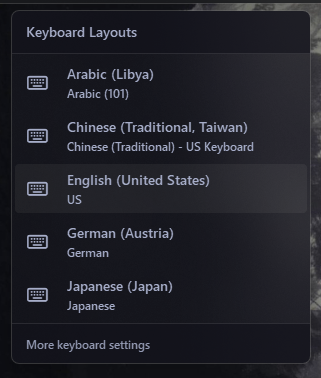
Language Widget Options#
Shows your current keyboard language or layout - like EN, DE, or RU - and lets you switch between installed languages from a popup menu. Updates in real time when you change languages with a keyboard shortcut.
| Option | Type | Default | Description |
|---|---|---|---|
label |
string | "{lang[language_code]}-{lang[country_code]}" |
The format string for the label. |
label_alt |
string | "{lang[full_name]}" |
The alternative format string for the label. Useful for displaying the full language name. |
update_interval |
integer | 5 |
The interval in seconds to update the language information. Must be between 1 and 3600. |
class_name |
string | "" |
Additional CSS class name for the widget. |
callbacks |
dict | See below | The dictionary of callback functions for different mouse actions. |
language_menu |
dict | See below | Options for the language menu. |
keybindings |
list | [] |
Optional hotkeys. See Keybindings. |
Callbacks#
The callbacks option maps mouse buttons (on_left, on_middle, on_right) to actions. All keys are optional, the values shown are the defaults.
callbacks:
  on_left: "toggle_label"
  on_middle: "do_nothing"
  on_right: "do_nothing"
Available actions:
toggle_label: A function to toggle the label between the main and alternative formats.toggle_menu: A function to toggle the visibility of the language selection menu.do_nothing: A placeholder function that does nothing when the mouse button is clicked.update_label: A function to refresh the label now.
Language Menu Configuration#
The language_menu option allows you to configure the popup menu for language selection. It accepts the following keys:
| Option | Type | Default | Description |
|---|---|---|---|
blur |
boolean | true |
Enables a blur effect in the menu popup. |
round_corners |
boolean | true |
If true, the menu has rounded corners. |
round_corners_type |
string | "normal" |
Determines the corner style; allowed values are normal and small. |
border_color |
string | "system" |
Sets the border color for the menu. Can be "system", None or HEX color. |
alignment |
string | "right" |
Horizontal alignment of the menu relative to the widget (left, right, center). |
direction |
string | "down" |
Direction in which the menu opens (down or up). |
offset_top |
integer | 6 |
Vertical offset for fine positioning of the menu. |
offset_left |
integer | 0 |
Horizontal offset for fine positioning of the menu. |
layout_icon |
string | "\uf11c" |
Icon displayed next to layout names in the menu. |
show_layout_icon |
boolean | true |
Whether to show the layout icon next to each language entry. |
Example Configuration#
language:
  type: "yasb.language.LanguageWidget"
  options:
    label: "{lang[language_code]}-{lang[country_code]}"
    label_alt: "{lang[full_name]}"
    update_interval: 5
    callbacks:
      on_left: "toggle_menu"
      on_middle: "do_nothing"
      on_right: "toggle_label"
    language_menu:
      blur: true
      round_corners: true
      round_corners_type: "normal"
      border_color: "system"
      alignment: "right"
      direction: "down"
      offset_top: 6
      offset_left: 0
      show_layout_icon: true
      layout_icon: "\uf11c"
Description of Options#
- label: The format string for the label. You can use placeholders like
{lang[language_code]},{lang[country_code]},{lang[full_name]},{lang[native_country_name]},{lang[native_lang_name]},{lang[layout_name]},{lang[full_layout_name]},{lang[layout_country_name]},{lang[iso_language_code]}. - label_alt: The alternative format string for the label. Useful for displaying the full language name.
- update_interval: The interval in seconds to update the language information. Must be between 1 and 3600.
- class_name: Additional CSS class name for the widget. This allows for custom styling.
- callbacks: Mouse event callbacks. See Callbacks.
- keybindings: A list of global hotkeys for this widget. See Keybindings.
- language_menu: A dictionary containing options for the language selection menu. It includes options like
blur,round_corners,round_corners_type,border_color,alignment,direction,offset_top,offset_left,layout_icon, andshow_layout_icon.
Example Style#
.language-widget {}
.language-widget.your_class {} /* If you are using class_name option */
.language-widget .widget-container {}
.language-widget .widget-container.caps-lock-on {} /* If Caps Lock is on */
.language-widget .label {}
.language-widget .label.alt {}
.language-widget .icon {}
.language-widget .widget-container.caps-lock-on .label {} /* If Caps Lock is on */
.language-widget .widget-container.caps-lock-on .icon {} /* If Caps Lock is on */

/* Language Menu */
.language-menu {}
.language-menu .header {}
.language-menu .footer {}
.language-menu .language-item {}
.language-menu .language-item.active {}
.language-menu .language-item .code {}
.language-menu .language-item .icon {}
.language-menu .language-item .name {}
.language-menu .language-item .layout {}
Example Style for Menu#
.language-menu {
    background-color: rgba(17, 17, 27, 0.4);
    min-width: 300px;
}
.language-menu .header {
    font-family: 'Segoe UI';
    font-size: 14px;
    font-weight: 600;
    margin-bottom: 2px;
    padding: 12px;
    background-color: rgba(17, 17, 27, 0.6);
    border-bottom: 1px solid rgba(255, 255, 255, 0.1);
}
.language-menu .footer {
    font-family: 'Segoe UI';
    font-size: 12px;
    font-weight: 600;
    padding: 12px;
    margin-top: 2px;
    color: #9399b2;
    background-color: rgba(17, 17, 27, 0.6);
    border-top: 1px solid rgba(255, 255, 255, 0.1);
}
.language-menu .footer:hover {
    background-color: rgba(36, 36, 51, 0.6);
    color: #fff;
}
.language-menu .language-item {
    padding: 6px 12px;
    margin: 2px 4px;
}
.language-menu .language-item.active {
    background-color:rgba(255, 255, 255, 0.1);
    border-radius: 4px;
}
.language-menu .language-item:hover {
    background-color: rgba(255, 255, 255, 0.05);
}
.language-menu .language-item.active:hover {
    background-color:rgba(255, 255, 255, 0.1);
    border-radius: 4px;
}
.language-menu .language-item .code {
    font-weight: 900;
    font-size: 14px;
    min-width: 40px;
    text-transform: uppercase;
}
.language-menu .language-item .icon {
    font-size: 16px;
    margin-right: 8px;
    color: #fff;
}
.language-menu .language-item .name {
    font-weight: 600;
    font-family: 'Segoe UI';
    font-size: 14px;
}
.language-menu .language-item .layout {
    font-weight: 600;
    font-family: 'Segoe UI';
    font-size: 12px;
}
Preview of the Widget#